
How OpenCode + ChatGPT Accelerated My Homelab
“Homelab work is fun until you forget what you changed last night.”
Running a homelab is equal parts experimentation and documentation debt. I wanted to move faster without losing track of what I changed, why I changed it, and how to undo it. The fix was to integrate OpenCode with ChatGPT and treat it as my infrastructure co-pilot.
This post documents how I wired that workflow together and the concrete things it helped me ship.
🧭 The Problem: Context Rot in a Fast-Moving Lab
My setup has multiple layers—Proxmox, VMs, LXC containers, Docker Compose projects, and SMB mounts. Each change might touch several systems. Keeping mental notes wasn’t sustainable, and ad-hoc tweaks made it hard to reproduce or explain what I did.
I needed:
- A shared source of truth
- Structured runbooks and plans
- Safe, repeatable changes
- A way to integrate new services fast without losing the plot
🧠 The Workflow: OpenCode + ChatGPT as a Co-Pilot
OpenCode gave me an interactive CLI layer where ChatGPT could:
- Read and update documentation
- Run safe commands and capture outputs
- Create service snapshots without leaking secrets
- Build dashboards and validate endpoints
Instead of asking it to “do everything,” I gave it a framework:
1) Agent Guidance
I created an AGENTS.md file so the agent knows the house rules (no secrets, no destructive commands, keep changes scoped).
2) Verified Context
The homelab state lives in a living document (homelab_context.md). When something changes, the agent updates it with real outputs, not guesses.
3) Repo Structure That Matches Reality
I organized the repo into docs/, plans/, services/, and runbooks/, so planning and execution stay separate but connected.
⚙️ What This Helped Me Ship
✅ Homepage dashboard
The agent deployed a Homepage container, configured widgets, and wired all the service links. It also fixed the host validation error by setting allowed hosts in config and environment.
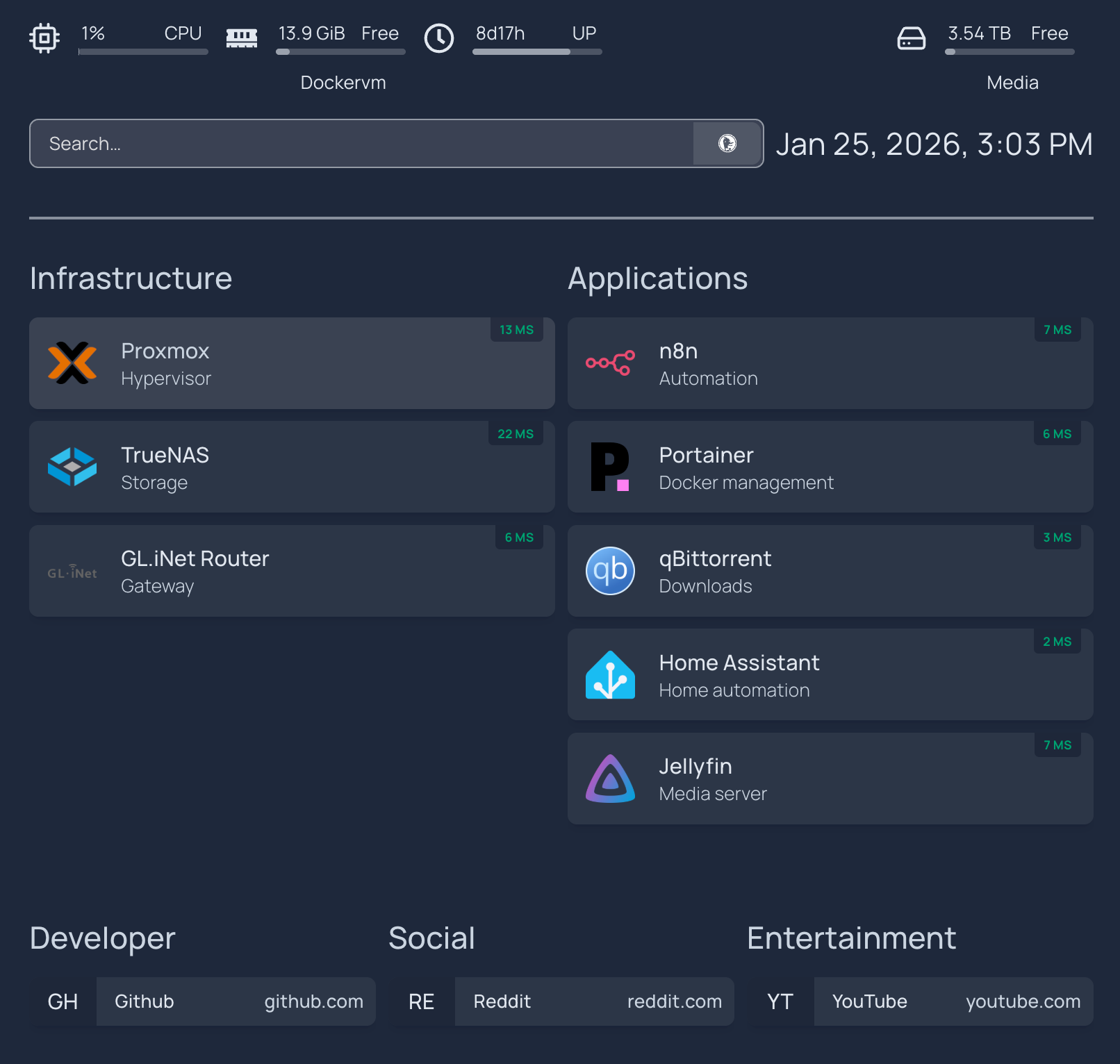
Current dashboard layout while the setup is still evolving.
✅ Service snapshots in Git
We captured sanitized compose snapshots for:
n8nqBittorrentPortainerHome AssistantHomepage
✅ Runbooks and docs
Every service change ends up as a doc update—no more “future me will remember.”
✅ Build small, iterate fast
I’m deliberately building the smallest useful version of each piece first. It’s easy to get discouraged by gorgeous dashboards on Reddit, but shipping a simple, working layout beats waiting for perfection. The polish can come later.
🔒 Guardrails That Kept It Safe
To avoid security or stability mistakes, I enforced a few rules:
- Secrets never enter Git
- env.example files instead of real
.env - No destructive commands without explicit confirmation
- Every change documented in the homelab context or service snapshot
🧪 Example Snippets
# Jump to Proxmox
ssh proxmox

# Update Homepage
docker compose -f /opt/homepage/docker-compose.yml restart

# List running containers
docker ps --format "table {{.Names}}\t{{.Status}}\t{{.Ports}}"
📈 Results So Far
- Faster iteration without losing context
- A clean, navigable repo that mirrors the real lab
- Dashboards and docs that stay in sync
- Safer changes with explicit runbooks
🔜 What’s Next
- Add richer widgets (API-powered) for Jellyfin, Portainer, and qBittorrent
- Automate backup snapshots for
/optconfigs - Add monitoring stack (Grafana + Prometheus)
📚 References
- Proxmox VE Documentation
- Docker Compose file reference
- Docker
pscommand reference - Homepage Docker installation
- Homepage configuration docs
- Portainer documentation
- Home Assistant documentation
- n8n documentation
- Installing qBittorrent
🧠 Meta Description
How I used OpenCode with ChatGPT to turn homelab sprawl into a documented, repeatable workflow—deploying dashboards, runbooks, and service snapshots without losing track of changes.