· 6 min read
How OpenCode + ChatGPT Accelerated My Homelab
How I used OpenCode with ChatGPT to turn homelab chaos into a documented, repeatable workflow with dashboards, runbooks, and service snapshots.
Running a homelab means making small changes across Proxmox, VMs, LXC containers, Docker Compose projects, and shared storage. I wanted help working through those changes without relying on chat history or my memory as the only record of what the lab looked like. In January 2026, I started using OpenCode with ChatGPT alongside a repository of service definitions, plans, and runbooks.
The goal was not to hand over the homelab to an agent. I wanted a repeatable loop: give the assistant the relevant project context, verify the live state before changing anything, make a small edit, inspect the diff and command output, then update the documentation. This post is a snapshot of that workflow and the Homepage dashboard work documented on January 25, 2026.
The lab needed a source of truth
The lab had multiple layers. A change to a Docker service could depend on a VM, an SMB mount, a firewall rule, or a DNS entry. If I made a change in a chat and did not record it in the repository, the next session had no reliable way to know what was actually deployed.
I organized the repository around how I operated the lab:
docs/for architecture, inventory, and current contextplans/for proposed work that had not yet shippedservices/for service-specific Compose files and configurationrunbooks/for repeatable recovery and operational steps
An AGENTS.md supplied repository-specific guidance, including keeping changes scoped, avoiding secrets, and asking before destructive operations. I also kept a living homelab context note with observations from the actual environment. That distinction mattered: a plan describes what I intend to do; a service file describes what I checked into Git; command output is evidence about the live system at that moment.
How I used OpenCode and ChatGPT
The post calls the workflow “OpenCode + ChatGPT.” OpenCode was the interface to the project files and tools; ChatGPT provided the model assistance. I am not documenting a particular authentication method here, and this is not a claim that the ChatGPT application itself directly manages the homelab. The important part of the workflow was keeping the model’s suggestions close to the repository and checking them against the system before treating them as fact.
For a service change, the process I aimed for was:
- Read the service definition, its documentation, and the relevant current-state notes.
- Check the running service or endpoint when the task depends on live behavior.
- Make one scoped change rather than asking for a broad rebuild of the lab.
- Review the diff and the output from any commands before proceeding.
- Record the final state, decision, and any follow-up work in the repository.
The model could help draft a Compose change, inspect files, or suggest a validation command. It could not make an unverified result true: a successful file edit did not prove that a container started, and a plan did not mean the change had been deployed. I kept those states separate in the notes.
The Homepage dashboard
One concrete result was a Homepage dashboard for the lab. I deployed the container, configured service links and widgets, and corrected a host-validation error by adding the allowed host values to the relevant configuration and environment. The screenshot below shows the layout on January 25: resource bars at the top and separate infrastructure, application, and other service cards.
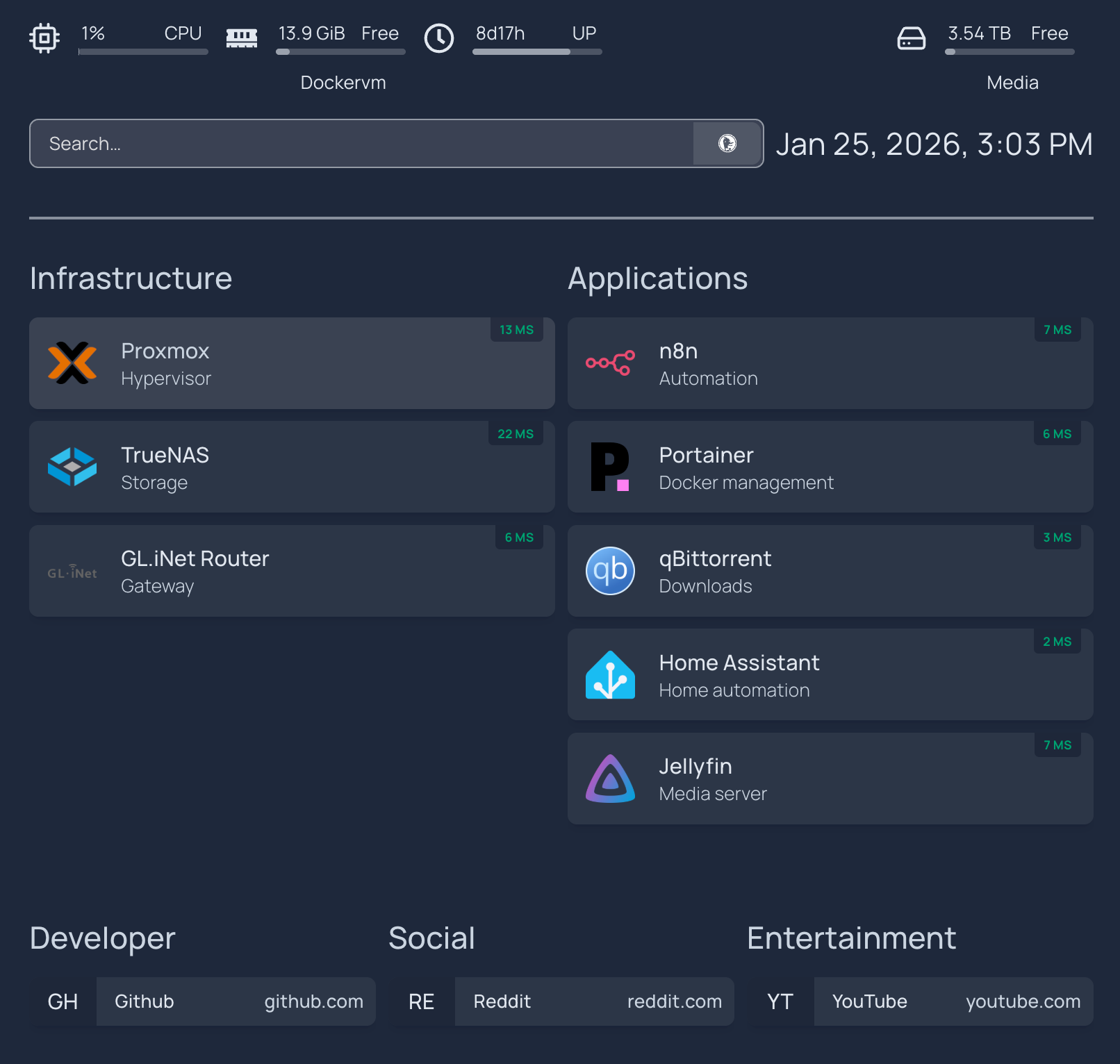
This dashboard was useful as a starting point, not a full monitoring system. It put links and a few status indicators in one place, but deeper metrics and logs were still on the plan. I did not treat a green service check as proof that its data was backed up or that every feature worked.
Keep the repository useful—and sanitized
I added selected Compose snapshots for n8n, qBittorrent, Portainer, Home Assistant, and Homepage. The purpose was to keep the deployment definitions reviewable and recoverable in Git. The snapshots had to be sanitized: .env.example files can document required variable names, but real credentials, tokens, private URLs, and rendered command output do not belong in a public or shared repository.
The runbooks and context notes were meant to close the loop after an operational change. I wanted to capture what was changed, how I checked it, and how to recover—not just paste a command into a transcript. That was an operating rule I was building toward, rather than a guarantee that every change had already been documented perfectly.
Guardrails are instructions, not a sandbox
My project guidance said to keep secrets out of Git, avoid destructive commands without confirmation, and keep work narrowly scoped. Those rules helped make expectations visible to the assistant, but they did not make every command safe. OpenCode tools operate with the permissions of the environment where they run; command output can also contain sensitive values. I still needed to review proposed commands, inspect diffs, redact outputs, and verify that a change affected the intended service.
Current OpenCode V2 permissions documentation describes allow, ask, and deny rules for tools. The precise interface and provider setup can change between versions, so I would use the documentation for the installed version rather than copy authentication steps from an older post. This article records the workflow I described in January 2026, not a current setup guide.
For small operational checks, I used commands such as:
# Restart the Homepage Compose project
docker compose -f /opt/homepage/docker-compose.yml restart

# Review running container status and published ports
docker ps --format "table {{.Names}}\t{{.Status}}\t{{.Ports}}"
These examples assume you are on the Docker host and have confirmed the correct project and Compose file. A command that restarts a service still changes the live system; the fact that it is short does not make it risk-free.
What changed after this snapshot
At the end of the January post, I listed API-backed Homepage widgets, automated snapshots for /opt configuration, and Grafana plus Prometheus as future work. The monitoring stack was documented shortly afterward in a separate observability post, where I described Prometheus, Grafana, Loki, exporters, and probes. That later build should not be read back into the January dashboard snapshot.
The broader lesson was that an AI assistant is most useful when it works against a maintained record of the system. A file tree, current-state notes, a plan, and a runbook each answer different questions. Keeping them distinct helped me move faster without confusing a suggested command with a deployed change.