· 6 min read
Homelab Observability: Grafana + Prometheus + Loki
A platform-engineer style recap of wiring a full observability stack for my homelab, with metrics, logs, and dashboards that stay useful after reboot day.
On February 2, 2026, I spent a homelab session on a different kind of feature: observability. I wanted one place to check whether services were responding, which host or container was busy, and what the logs said when something failed. I connected Prometheus metrics and Loki logs to Grafana, then built dashboards around the questions I wanted to answer.
This is a snapshot of the stack I documented that day. It does not include internal IPs or Tailscale DNS names. Some choices—especially Promtail—have since changed status, so I call out what I would do differently for a new deployment today.
The data paths
The stack had two main paths. Prometheus scraped numeric metrics from exporters and probes. Promtail collected log lines and sent them to Loki. Grafana queried both systems so I could move from a service status or resource graph to related logs.
Hosts and containers ──> Node Exporter / cAdvisor ──┐
Services             ──> Blackbox Exporter          ├──> Prometheus ──┐
TrueNAS              ──> Netdata Prometheus output ─┘                 │
                                                                       ├──> Grafana dashboards
Containers and system logs ──> Promtail ──> Loki ─────────────────────┘
Node Exporter provided host-level CPU, memory, disk, network, and uptime metrics. cAdvisor added per-container resource data. Blackbox Exporter checked HTTP endpoints from outside the services themselves; that distinction helped separate “the host is up” from “the web service answered.”
Promtail shipped container and system logs into Loki. Grafana then gave me one interface for both metrics and log queries. This did not make the stack a full incident-management system, but it gave me a better starting point than opening each service and host separately.
Adapting exporters to the lab
I added readable service labels to Prometheus targets so dashboard legends showed names instead of raw URLs. That made the charts easier to scan and let me group panels around services rather than endpoint strings.
TrueNAS needed a different path. I could not expose Node Exporter there in the way I wanted, so I ran Netdata and scraped its Prometheus-compatible metrics. The TrueNAS dashboard showed CPU and other system measurements from that source. For the OpenWrt router, I used node-exporter Lua modules to collect Wi-Fi signal, bitrate, and connected-station metrics, then kept those panels on a separate router dashboard.
The dashboards each had a job:
- Homelab Overview: service status, node CPU and memory, top containers, and errors.
- Services Overview: CPU, memory, disk, network, uptime, and status by service or node.
- TrueNAS Netdata Overview: metrics collected through Netdata.
- Router Overview: Wi-Fi and router statistics.
- Jellyfin Overview: service health and host metrics.
The dashboard snapshot
This excerpt shows the kinds of measurements I had connected: CPU usage across nodes, TrueNAS CPU via Netdata, and CPU for individual containers. The graph labels identify the series, but the screenshot is only a point-in-time view; it is not a performance benchmark or proof that every host had complete coverage.
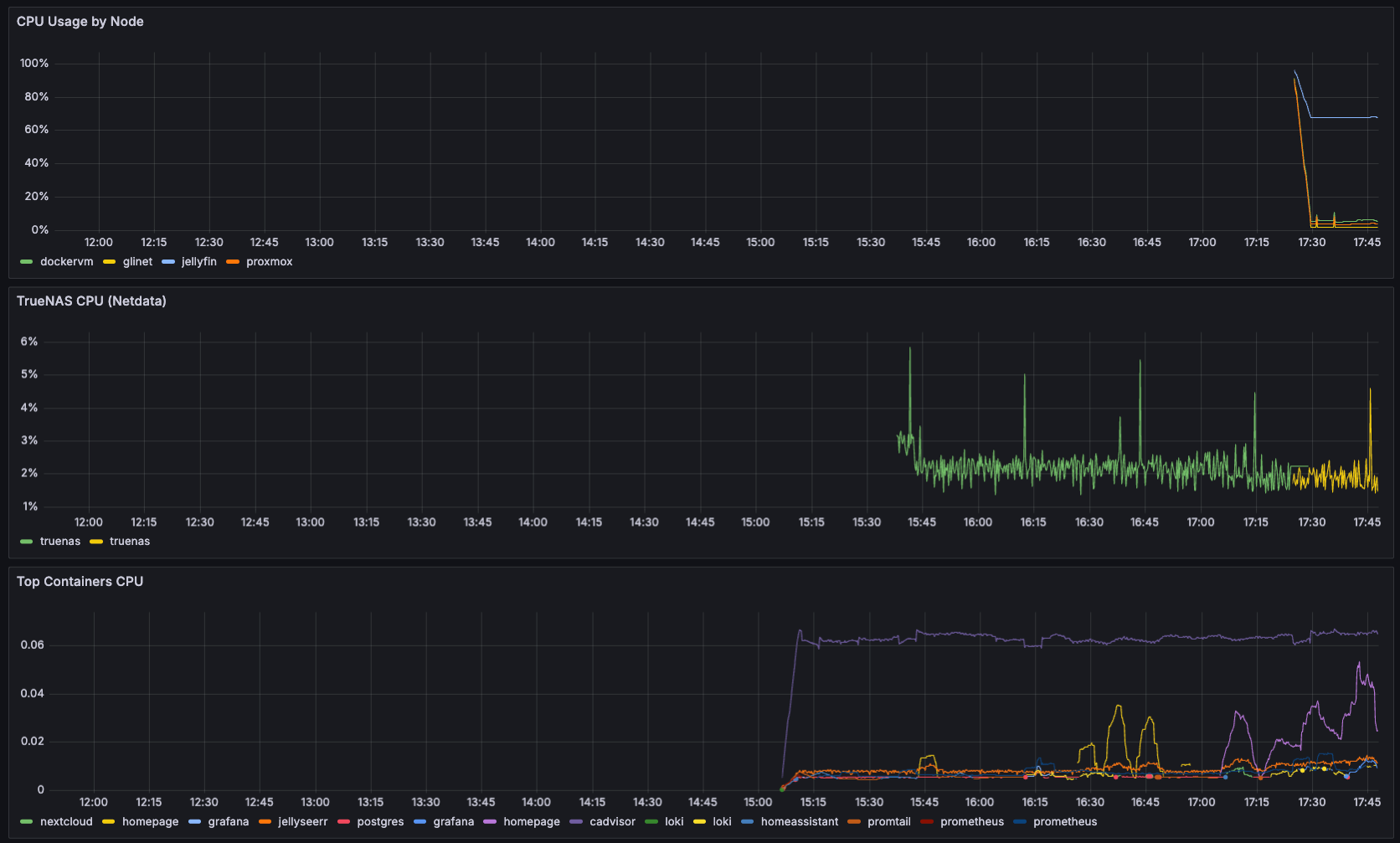
I embedded the Homelab Overview in Homepage using an iframe. To get past a Grafana login loop, I enabled iframe embedding and anonymous Viewer access, and corrected Grafana’s root URL and cookie settings. Anonymous access removes the login prompt; it does not authenticate the viewer. I only wanted this view inside my trusted network, so this configuration must be paired with network access controls and should not be exposed publicly. For a shared or internet-facing dashboard, use an authenticated arrangement or a deliberately public dashboard instead.
The problems that took time
The dashboard exposed integration problems of its own:
- cAdvisor could not talk to Docker. Updating cAdvisor to a version compatible with the Docker API resolved the connection issue. I did not record the exact version in this post, so I am not guessing one here.
- Prometheus and Loki could not write their data. Their container processes needed ownership of the mounted data directories. I changed the directory ownership to match the IDs used by the images rather than loosening permissions broadly.
- The OpenWrt exporter only listened on loopback. Prometheus on another host could not scrape it. I changed the listener to an address reachable on the LAN and kept the endpoint within the trusted network.
- Homepage was reachable only on its LAN address. Tailscale Serve on another host needed to proxy to the address reachable from that host, not its own
localhost.
The iframe setup also needed careful treatment. GF_SECURITY_ALLOW_EMBEDDING controls whether Grafana can be framed; anonymous Viewer access controls who can see the dashboard without logging in. They solve different parts of the problem and neither should be enabled without deciding who can reach Grafana.
What I could answer afterward
With the dashboards and probes in place, I could check whether a core HTTP service answered, compare CPU and memory across nodes, see which container was using resources, and search Loki when logs became noisy. That made troubleshooting more directed, but the telemetry still needed interpretation. A probe can say that a URL responded; it cannot tell me that the application returned the data I expected.
As of February 2, I still planned alerting channels, optional Proxmox exporter metrics, and panels for slow API endpoints. Alerting was not part of the shipped result in this post.
Promtail status today
When I wrote this in February, Promtail was the log shipper in the deployed stack. Grafana declared Promtail end-of-life on March 2, 2026 and says future development is in Grafana Alloy. That happened after this post’s date. A new Loki deployment should use a supported log-collection path; an existing Promtail setup should be migrated and tested rather than assumed to work unchanged forever.
Grafana provides an Alloy conversion tool for Promtail configurations, but its documentation calls the conversion best-effort and warns that metrics, dashboards, alerts, or behavior may need changes. The source config should be reviewed and the new pipeline tested before replacing the running collector. I have not claimed that this migration is complete in this article.